Engineering teams are increasingly evaluating AI coding agents, whether through formal procurement or individual developer adoption. Most of them run it the way they used to evaluate SaaS products: read the feature list, watch the demo, pick the one that scored highest on a benchmark someone else ran. That approach doesn't survive contact with a real codebase, because choosing an AI coding agent is an engineering workflow decision rather than a model choice. The agent reshapes how developers write code, investigate bugs, review pull requests, and learn unfamiliar systems, and a feature comparison sees none of it.
"On average, developers report that approximately 46% of the code they produce is fully generated by AI agents, 39% is written with AI assistance, and 27% is written entirely manually." Source: Preliminary findings from the JetBrains Developer Ecosystem Survey 2026 • 15,000+ developers worldwide
If you're a tech lead, engineering manager, staff engineer, or platform engineer weighing which agent your team should standardize on, the decision deserves the same rigor you'd apply to choosing a CI/CD system or a database. Start your evaluation with your own team.
Start with your team's workflow
Before evaluating any AI coding agent, document how your team works. Focus on the daily problems you actually solve, not the ideal-state problems you wish you were solving. Your workflow description is the filter that rules out tools that wouldn't fit, regardless of benchmark scores.
Greenfield teams often put more weight on fast code generation, scaffolding, and test generation because a larger share of their work involves creating new code. Repository understanding still matters, but the balance may differ from a mature codebase where most tasks require navigating years of existing architecture and conventions.
A large Java monolith built up over many years doesn't yield to an agent that can only reason about the currently open file. Teams in large, mature codebases need one that knows the class hierarchy and can follow a dependency across a module boundary, so a change here doesn't break something three directories away. Legacy systems put the same weight on the same capability. A long-lived Rails application with minimal documentation, or a C++ codebase with tacit knowledge baked into variable names, has to be explained before it can be safely changed, which makes navigation and investigation count as much as generation.
Enterprise application teams answer to a wider organizational audience. The agent has to clear procurement, fit the SSO and audit logging already in place, and stay governable across a dozen teams with different habits.
Regulated environments have constraints that aren't negotiable. Fintech and healthcare teams, and anyone working under a defense contract, have to answer two questions before any others: Where does your code go when you send it to the AI, and what data leaves your network? For some teams, data-handling requirements narrow the options immediately. BYOK can route requests directly to a chosen provider, while self-hosted endpoints or Junie Local can keep inference under tighter infrastructure control. These setups have different data-handling implications and should be evaluated separately.
Platform engineering teams weight it differently again, caring more about CI/CD integration, Terraform and Kubernetes support, and infrastructure-as-code quality than about object-oriented refactoring.
Write a two-sentence description of how your team works before you open a single vendor website. That description is your evaluation filter.
Define your evaluation criteria
Evaluate each criterion below against a small set of representative tasks and record both whether the agent meets your minimum requirement and how well it performs.
Repository understanding. Can the agent navigate an unfamiliar repository? Ask it to find where user authentication is handled, explain the data model, or trace a request from the API layer to the database. This is a better test than code-generation benchmarks because it reflects what developers need most of the day: context about code that already exists.
IDE integration. Does the agent run inside your editor, or does it require a context switch to a browser or a separate application? Every time a developer has to stop typing, copy code, paste it somewhere else, and copy back a response, that's friction. Across dozens of interactions a day, it compounds. An agent embedded in the IDE removes much of that loop, though developers will still move between tools, depending on the task.
Multistep reasoning across files. Can it handle a task like "add rate limiting to all endpoints that accept user-submitted data", which requires finding the relevant files, understanding the current patterns, and making consistent changes across the codebase? Or does it only handle single-function prompts?
Debugging and investigation. Can the agent help you understand why a test is failing, trace an exception through a stack, or identify where a race condition might originate? Investigation is where senior engineers spend a disproportionate amount of their time.
Refactoring support. Renaming a symbol across 40 files, or pulling a class out of a god object, requires the agent to understand scope and impact. Miss three references in another module, and the refactor has traded one problem for several.
Code review assistance. Can it summarize a pull request, identify risks in a diff, or suggest improvements without inventing context? Teams running AI review at scale use it to clear routine feedback before a human reviewer opens the PR, which is especially valuable where senior engineers are the review bottleneck.
Test generation quality. Ask it to write tests for a module with existing behavior. Do the tests cover meaningful edge cases, or do they mostly assert that result != null? Trivial tests give false confidence in coverage, which is worse than no tests.
Security and data handling. Where does your source code go when the agent processes a request? Does the provider train on your code? Can you route requests through your own API keys? These aren't optional questions for regulated environments or security-conscious organizations. Ask the vendor for their data retention policy, any relevant compliance certifications (SOC 2 Type II, ISO 27001), and a list of subprocessors that handle your code, rather than accepting a link to a general privacy policy.
Team collaboration. Can developers share prompts, workflows, or context configurations across the team, or does every engineer start from a blank slate? Shared setups keep a multiperson pilot consistent, and they cut ramp-up time when the tool reaches the wider team.
Enterprise readiness. Enterprise evaluation often includes capabilities such as single sign-on (SSO), audit logs, usage governance, model controls, and centralized administration. Check these against your organization's actual procurement and security requirements.
Use this framework to shape a short scoring rubric before the pilot begins. Weight the criteria that reflect your workflow description from the previous section.
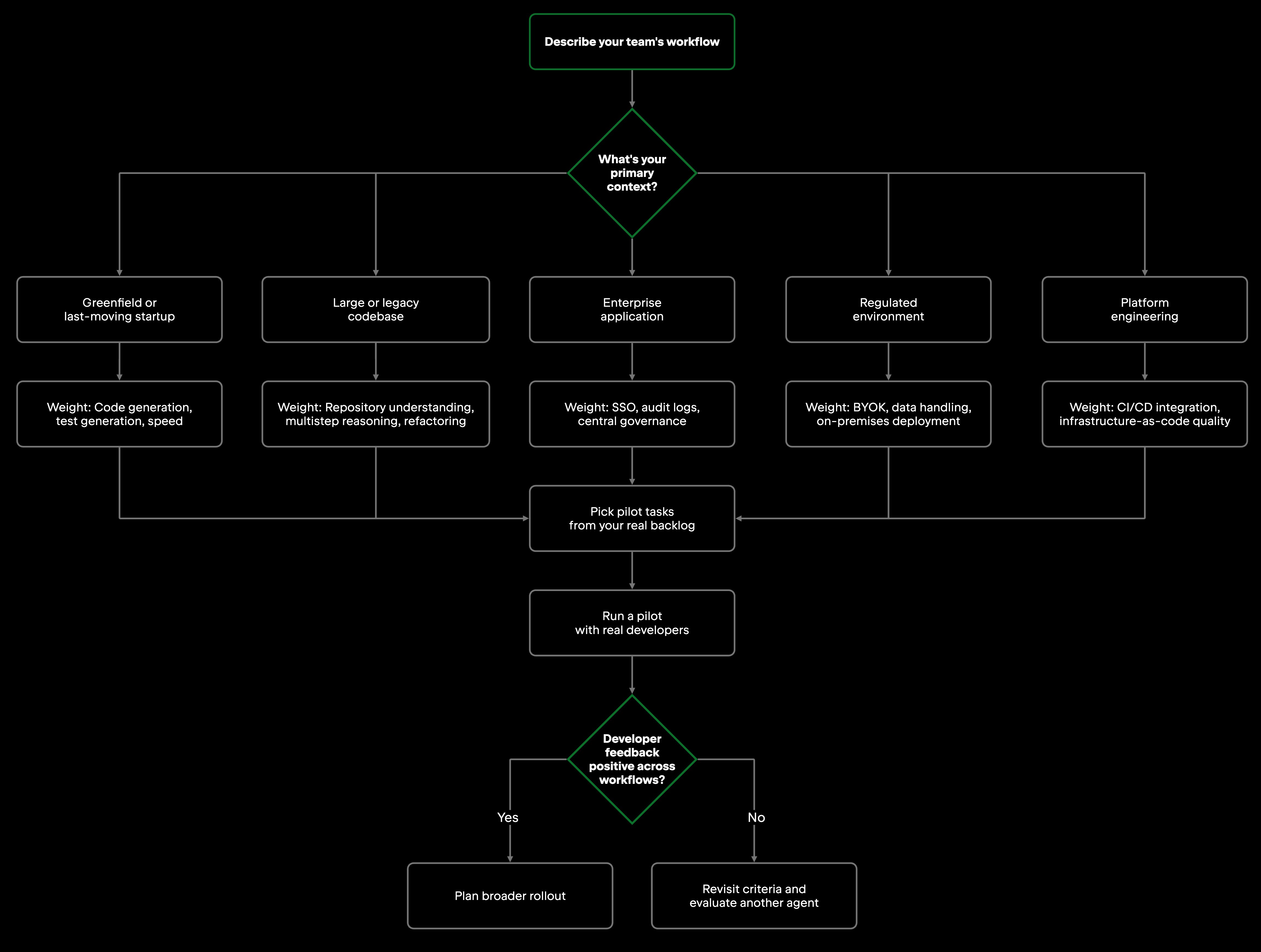
Run a pilot before making a decision
A structured pilot on your real codebase reveals what vendor demos never show. Demos are optimized to impress: They show the tool succeeding at tasks the vendor chose, on codebases the vendor knows, with prompts the vendor refined. None of that reflects what your developers will do on day one.
A good pilot uses real tasks from your backlog.
- Repository onboarding. Drop the agent into a repository without explaining the project structure. Ask it which module owns a given business rule, what happens when a specific endpoint is called, and which parts of the system would notice if a table changed shape. This mirrors what happens when a new engineer joins your team, and it directly tests their understanding of a repository.
- Debugging an existing issue. Pull a real bug from your current backlog and ask the agent to reproduce it, trace the cause, and suggest a fix. Watch how it reasons through the problem. The route matters alongside the answer: a reproducible investigation grounded in the actual call stack tells you more than a correct answer reached by guesswork.
- Reviewing a pull request. Give the agent a real PR from your history, ideally one where a reviewer caught something important. Ask it to summarize the changes, identify risks, and suggest improvements, then compare its output to what your reviewer said. Where the two diverge is where you learn something.
- Generating meaningful tests. Pick a module with low test coverage and ask the agent to write tests for it. Run them, then read them. Are they testing behavior with real consequences (edge cases, error paths, boundary conditions), or do they mostly restate the implementation back to itself? Any agent can produce a hundred assertions; the question is whether one of them would catch a regression.
- Refactoring across files. Ask the agent to perform a change that requires touching multiple files, such as extracting a shared utility, or consolidating validation logic that has been copy-pasted across half a dozen handlers. Check whether the changes are correct and complete. Partial refactors are an important failure mode to watch: an agent may report success while leaving call sites or related behavior unchanged elsewhere in the repository.
- Navigating legacy code. If your team maintains older systems, ask the agent to explain a dense module that it's never seen. Ask follow-up questions. See whether it acknowledges uncertainty or confidently makes things up. For legacy codebases, honesty about what it doesn't know is as consequential as what it does know.
Six tasks is a lot to ask of a two-week pilot. If you can only run three, take onboarding, debugging, and the multifile refactor. Together, they test repository understanding, investigation, and coordinated changes across the codebase.
After the pilot, collect structured feedback from the developers who used the tool on real work. Ask them specifically: Where did it save you time, where did it frustrate you, and would you use it on a high-stakes change?
Common evaluation mistakes
Choosing based on the underlying model alone. Claude, GPT, and Gemini models all power multiple AI coding tools. The model affects output quality, but so does how the tool uses it – what context it provides, how it manages AI agent context windows, and whether it can access your IDE's code intelligence. Two tools built on the same model can produce markedly different results on your codebase.
Focusing only on code generation. Generation is the capability that shows best in demos and requires the least repository understanding. Debugging, refactoring, and navigating large codebases are harder problems, and they're often where the real productivity gains live. Evaluate for those.
Ignoring workflow integration. An agent can be capable and still add friction if developers constantly have to move context between tools. During the pilot, watch how naturally it fits the environments your team already uses – IDE, terminal, browser, CI, or cloud workflows – and whether context survives those transitions.
Overlooking repository understanding. Asking the agent to write a function in isolation tells you almost nothing about how it will perform on your work. Asking it to navigate an unfamiliar codebase, find the right extension point, and make a safe change tells you most of what you need to know. Test the capability that reflects how developers work.
No pilot at all. Skipping a pilot increases the risk of discovering workflow, security, or adoption problems only after an organization-wide rollout. By then, contracts and deployment decisions may be harder to reverse.
Underestimating security requirements. If your team works with regulated data, intellectual property, or customer PII (personally identifiable information), understand the tool's data handling model before you put your code in front of it. Check this first, before investing time in evaluation.
One workflow for the whole team. A staff engineer debugging a production incident needs different capabilities from a junior engineer implementing a feature, and your agent has to serve both. If your pilot involves only senior engineers, you'll miss the friction that newer developers feel immediately.
Junie against these criteria
The criteria stay abstract until you run them against something. Here are three of the criteria applied to one agent, JetBrains Junie. Run the same evaluation against every candidate on your shortlist.
Repository understanding. The onboarding task from your pilot list runs against Junie as written. Put it in front of an unfamiliar repository and see what it can account for before it proposes a change. Running inside a JetBrains IDE, it answers those questions by calling the IDE's code intelligence as it needs it, rather than working from whatever text it was handed. Separately, repository-level instructions such as AGENTS.md can provide persistent project guidance, including conventions and preferred commands. It is not a security boundary; approval settings, tool access, and execution restrictions should be evaluated separately.
Workflow integration. Junie runs in JetBrains IDEs and is also available through Junie CLI for terminal and CI workflows, and through compatible ACP clients. When connected to a running JetBrains IDE, it can use IDE capabilities such as symbol-aware search, code inspections, and test workflows. This matters during evaluation because access to IDE code intelligence can give an agent richer structural context than working from pasted text alone.
Debugging and investigation. Junie supports a dedicated Debug mode in compatible JetBrains IDEs. It can work with a live debugger, manage breakpoints, inspect runtime state, and evaluate expressions. Include a real debugger task in the pilot to test how well it investigates a failing case.
These examples show how the criteria become concrete once they are applied to a product. Junie's IDE integration and debugging capabilities may matter heavily for one team and much less for another, which is why the same evaluation should be repeated for every agent on your shortlist.
Team evaluation checklist
Use the checklist below to confirm minimum requirements during the pilot, then score the quality criteria separately where useful.
- Can the agent navigate and reason across the repository, not just the file that's currently open?
- Does it integrate with your IDE?
- Can it reason across multiple files and make consistent changes?
- Does it support debugging and investigation, not only generation?
- Does it improve review workflows, summarizing diffs, catching risks, and suggesting improvements?
- Does it generate tests that cover edge cases and error paths?
- Does it meet your security and data-handling requirements, including any requirements around model providers, BYOK, or self-hosted inference?
- Do developers actually want to continue with it after two weeks of using it on real work?
That last question matters alongside the technical criteria. A tool that clears the technical bar but sees little voluntary use after the pilot is unlikely to deliver much value.
Final thoughts
There is no universally best AI coding agent, only the one that fits how your team already works. The right choice depends on your repositories, workflows, IDE, security posture, and whether your developers will want to use it after the novelty wears off.
The weighting changes with the environment. Large, established codebases put more pressure on repository understanding. Teams sensitive to workflow friction should pay close attention to how naturally an agent fits their development tools. In regulated environments, security and data-handling requirements may rule out options before other criteria are considered.
Run a pilot on real work, collect feedback from the developers doing it, and weight your criteria against your own workflow. A pilot and honest developer feedback will tell you more than any comparison table or benchmark score.
Frequently asked questions
How do I evaluate an AI coding agent without running a full pilot? You can narrow the field without a full pilot, but it is difficult to judge workflow fit reliably without trying an agent on your own code. If time is limited, run three representative tasks: repository onboarding, debugging an existing bug, and a multifile refactor.
What's the most important criterion when choosing an AI coding agent for a large codebase? Repository understanding is one of the most important criteria for a large codebase. Test whether the agent can navigate modules, trace dependencies, and make coordinated changes without missing related code. Security, language support, and deployment constraints may still act as hard requirements for your organization.
Does the underlying model (Claude, GPT, Gemini) determine which AI coding agent to choose? A tool with effective repository retrieval can perform very differently from a bare chat interface using the same model on repository-level tasks, because the AI agent architecture around the model – including context retrieval, conversation management, and IDE hooks – can significantly affect the result.
What data handling questions should I ask before adopting an AI coding agent? Ask whether the provider trains on your code and where source code is processed and stored. Treat BYOK and local or on-premises inference separately: BYOK can send requests directly to your chosen provider, while self-hosted endpoints or local inference can keep processing within infrastructure you control. For regulated environments, evaluate each setup’s data-handling implications before adoption.
How long should an AI coding agent pilot last? There is no universal pilot length. The pilot should run long enough for developers to use the agent on representative day-to-day work and encounter more than the initial happy-path tasks. Larger or more regulated rollouts may need longer evaluation periods. Match the length to the cost of being wrong, and make sure the developers who ran the tasks are the ones whose feedback counts at the end.
What makes test generation quality a meaningful evaluation criterion? Coverage numbers move regardless of whether the tests mean anything. A suite that calls every function and asserts no exception was thrown will report a healthy percentage and catch nothing. During your pilot, run the tests the agent writes, then read them. The ones worth having are the ones that would fail if someone broke the behavior they cover.
Can an AI coding agent replace code review by senior engineers? AI coding agents can assist with code review, but teams should not treat them as a substitute for human accountability on changes that require architectural, security, or business judgment. They can summarize diffs, flag potential risks, and suggest improvements, which may reduce routine review work.
What's the difference between an AI coding assistant and an AI coding agent? Broadly, an AI coding assistant responds to individual prompts: You ask a question, it answers, and you apply the result manually. A coding agent goes further by taking action across multiple steps. Given a goal like "migrate every callsite off the deprecated payment client", it identifies the relevant files, makes the changes, runs the tests, and reports back. It works within the boundaries you set, including scoped permissions, approval gates, and review before merge. What changes is the execution model rather than the oversight – you delegate the task instead of driving each step.