Nearly 90% of developers now use AI coding agents at work, and the review burden came with them. In the JetBrains Developer Ecosystem Survey 2026, 80% of agent users review AI-generated code often or always, and when they do, they look hardest at functional correctness (77%) and code quality (76%). No tool removes that review time. It only moves, depending on where in your workflow the code appears and what shape it arrives in.
Junie and GitHub Copilot both cut repetitive development work, but they enter the workflow at different points and hand you different things to check. This comparison works through how each one behaves across everyday engineering tasks, from writing code to navigating an unfamiliar repository, running multistep changes, and reviewing a pull request, so you can match a tool to where your own time actually goes instead of to the longer feature list.
Quick comparison
Capabilities below follow each vendor's own documentation as of September 2026, not a hands-on benchmark.
| Feature | Junie | GitHub Copilot |
|---|---|---|
| Primary focus | Agentic multistep coding tasks across JetBrains IDEs, the terminal, CI, and compatible ACP clients | Both agentic and completion-based coding, across IDEs, the terminal, and GitHub.com |
| Development surfaces | JetBrains IDEs, Junie CLI, CI workflows, and compatible ACP clients | VS Code, Visual Studio, JetBrains IDEs, Eclipse, Xcode, CLI, and GitHub.com |
| GitHub integration | GitHub Action that reviews pull requests and posts inline comments, plus IDE-based workflows | Native across GitHub.com, Actions, and GitHub Mobile, including a cloud agent you assign an issue to |
| Multistep development tasks | Multistep tasks across IDE and CLI workflows, with Plan mode available for read-only planning before implementation | Agent mode in the IDE, plus a cloud agent that works autonomously in a GitHub Actions environment and opens a pull request |
| Pull request review | In-IDE review with per-file revert, plus automated review in CI via the Action | Review in the IDE and on GitHub, on request or automatically, with summaries and inline comments |
| Repository understanding | Uses connected JetBrains IDE intelligence for project context; JetBrains Air Context extends context across repositories and agentic workflows | Uses editor and repository context, with semantic repository indexing in supported interfaces |
| Team workflows | JetBrains Air Teams for shared agentic workflows, automations, and cloud tasks; Air Governance for organization-level policy and cost management | Copilot Business and Enterprise with centralized policy management |
Writing and editing code
Both tools generate new code, edit existing code, explain unfamiliar functions, and refactor. What differs is how much of the task each one takes on, and how much context it can draw from while doing it.
Junie is JetBrains' coding agent, available in JetBrains IDEs, as a CLI, in CI workflows, and through compatible ACP clients. You can ask it to generate a function, refactor a class, or explain what a module does. It can query the IDE's code intelligence on demand, asking for resolved types, symbol references, and call graphs, so its suggestions reflect the structures actually present in the project instead of generic patterns. Alongside the agent, JetBrains IDEs provide AI completion for single lines and whole blocks, including next edit suggestions as you type. One scoping note: the Junie CLI and Junie in the AI chat do not have feature parity, and the CLI carries the fuller feature set, so check any capability you plan to rely on against the surface your team will actually use.
GitHub Copilot began as a completion-first assistant and now also runs agents that drive multistep work on their own, in the editor and on GitHub itself. Its inline completions are fast and cover a wide range of languages and frameworks, and Copilot Chat answers questions, requests modifications, and explains code without leaving the editor. Next edit suggestions are available too, though in VS Code, Xcode, and Eclipse rather than in JetBrains IDEs. Copilot draws context from open files and, in current versions, from the wider workspace, so its accuracy depends on how much of the relevant code is in scope. On large multi-layered codebases where types and dependencies span many files, more of that context has to be brought in deliberately.
The practical test is how much you have to explain before the tool is useful. In a JetBrains IDE, Junie can ask for what the IDE has already resolved. In a mixed-editor team, that counts for less than having the same completion behavior in every editor someone opens.
Working with existing codebases
How much of an unfamiliar repository an agent can actually reach decides whether exploring it saves time or wastes it.
Junie can also draw on JetBrains Air Context, formerly JetBrains Context. Air Context provides organizational memory for agentic work, helping relevant context carry across repositories, execution, automation, and coordination. This complements the project-level intelligence Junie can use from a connected JetBrains IDE rather than replacing it.
Inside a JetBrains IDE, Junie can also call the capabilities you would otherwise use by hand, asking for usages of a symbol, the inheritance hierarchy of a class, or the run configuration for a test. Locating the right file and working out how it fits the project structure use the same machinery the IDE already runs.
GitHub Copilot approaches the same problem through repository indexing, which makes a repository semantically searchable so the assistant can retrieve relevant files beyond whatever happens to be open in the editor. For repositories hosted outside GitHub, including local ones, semantic indexing works by uploading that code to GitHub to make it searchable. Semantic indexing of non-GitHub repositories is also available through Copilot in VS Code. The GitHub.com restriction refers to account hosting: it isn't supported with GHE.com or GitHub Enterprise Server. The feature is policy-controlled, disabled by default, and uploads the indexed code to GitHub, so on a non-GitHub codebase it is a deliberate decision rather than something you inherit. Copilot also carries what it learns forward: Copilot Memory, in public preview, stores repository-level facts such as coding conventions, architectural decisions, and build commands, so an agent picks those up on a later session instead of waiting to be told again.
The two products also differ in how broader context is assembled. Copilot uses repository indexing and memory within its supported GitHub and editor workflows, while Air Context is positioned as a shared context layer across agentic work. Which matters more depends on whether your problem is finding code inside a repository or carrying organizational context across tools and workflows.
Multistep development workflows
Plenty of real tasks refuse to fit in one prompt. Implementing a feature can mean updating a service layer, writing tests, changing a migration, and confirming nothing else broke.
Junie runs as a full coding agent. Give it a task and it works through the required steps, checking results as it goes and looping back when something needs another pass. If you want to review the approach before implementation, Plan mode provides a separate read-only planning workflow. Along the way it can edit files, run commands, execute tests, and report progress. When the task finishes, every changed and added file is listed in a Done panel, where you review them and selectively revert file by file before accepting or rejecting the result.
GitHub Copilot's agent mode runs the same shape of loop from the chat panel. You submit a task, and Copilot works out which files to change, streams the edits into the editor, keeps a working set of everything it has touched, and runs or proposes terminal commands according to the configured approval settings. It iterates to remediate problems until the task is complete, then hands you the working set to review.
Both agents can work through multistep tasks and expose controls over what they are allowed to execute. The exact approval flow depends on the interface and configuration: terminal commands, external tools, and other sensitive actions may require confirmation unless they have been explicitly allowed. In both cases, the resulting code changes still need developer review.
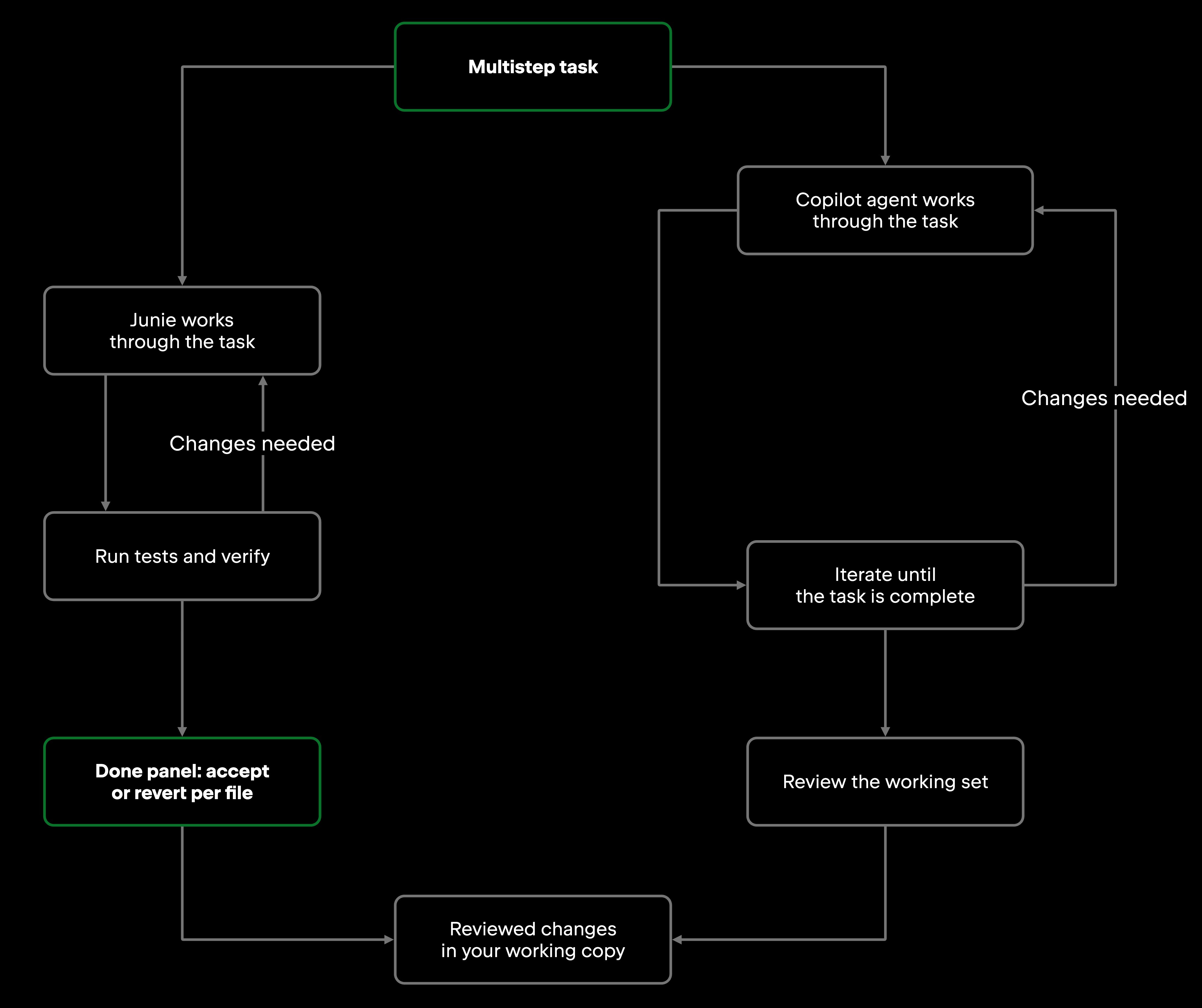
Both agents iterate as needed before handing the resulting changes back for developer review.
Both vendors can also move longer-running work off the critical path. Junie CLI supports multiple live sessions and Git worktrees for isolating concurrent changes. At the team level, JetBrains Air Teams provides shared cloud environments, automations, and parallel cloud tasks that do not depend on a developer's local machine. Copilot moves delegated work to GitHub through its cloud agent, which can take an issue and return a pull request.
The practical difference is where delegated work runs and where the result comes back for review: in a local development workflow, a shared cloud environment, or as a pull request on GitHub.
Pull request review
Reviewing agent-generated code is a fixed cost of working with agents, not a temporary one, and the JetBrains Developer Ecosystem Survey 2026 is specific about what that review is looking for. Correctness and quality lead, but architecture, security, and readability follow closely, and those are judgments about how a change fits a system rather than whether it runs.
Junie hands you that judgment early. Its per-file Done panel sits inside the IDE, where the type graph, navigation, and test tooling are a query away, so architectural and security questions can be answered against the real project before you push the changes or open a pull request. Junie CLI adds a dedicated pass on top of that: the /review command runs a read-only subagent over your local diff, scoped to changes from main, the last commit, or unstaged work. It can open files and search the project to build context, but it never edits, builds, tests, or commits. That same review reaches the pull request through Junie's GitHub Action, which runs the same review backend as the local command, so what you see before committing is consistent with what would be reported on the pull request itself.
GitHub Copilot reviews at both points too, and GitHub's own guidance is to use it in that order: request a review in the IDE before opening the pull request, then again on the pull request itself. On GitHub.com you add Copilot under Reviewers exactly as you would a colleague, or configure it to review every pull request automatically. Copilot also generates pull request summaries and suggests changes you can apply in a couple of clicks, accepting one or grouping several into a single commit. Asking it to explain a specific hunk shortens the ramp-up on unfamiliar code, though that explanation is drawn from the diff and surrounding files, so it describes what a change does more reliably than why it was chosen.
| Review point | Junie | GitHub Copilot |
|---|---|---|
| Before you commit | /review in Junie CLI, read-only, over your local diff | Request a review in the IDE |
| On the pull request | GitHub Action posts inline comments | Added under Reviewers, with comments usually in under 30 seconds |
| Without being asked | GitHub Action, plus GitLab CI/CD on every opened merge request | Configure automatic review of every pull request |
The "IDE versus platform" split that used to separate these tools no longer holds. What differs now is what each one can reach at each point: Junie's local pass runs against the live project, while Copilot's review on the pull request has the diff, its history, and the surrounding repository. Neither substitutes for human review, and GitHub says as much in its own documentation.
Working inside the IDE
The editor and agent together shape which navigation, refactoring, debugging, terminal, and search capabilities are available during a task.
In JetBrains IDEs, both are available and they arrive differently. Junie can use JetBrains IDE tools such as symbol resolution, usages, and project structure. Other ACP agents, including Copilot when configured through AI Chat, can also access IDE tools when enabled, so the difference depends on the specific integration and available tool access. Copilot arrives two ways. The GitHub Copilot plugin is the full experience, with inline completions, Copilot Chat, and code review. Copilot is also available as a native agent in the AI chat over the Agent Client Protocol, which is narrower by design: chat and agent capabilities, but not code completion, next edit suggestions, inline chat, code review, or commit message generation.
In VS Code the picture inverts. Copilot is at its most complete there, with agent mode, next edit suggestions, and agent skills all generally available, and GitHub's own feature matrix marks some capabilities as preview in JetBrains IDEs where they are already generally available in VS Code. Junie has no VS Code extension, so the practical route is Junie CLI in the terminal beside the editor rather than inside it.
Outside those two, reach comes down to which half of the Agent Client Protocol your editor implements. Both agents can participate in ACP-based editor integrations, although available capabilities depend on the client and integration. If you work outside the mainstream editors, check whether your editor supports the required ACP integration and which agent capabilities it exposes.
The friction point day to day is approvals. Junie's Action Allowlist lets developers configure which actions can run without repeated approval. In the IDE plugin, a single MCP allowlist rule currently applies to all MCP tools, while Junie CLI supports more granular MCP rules, including server prefixes. Copilot provides its own approval controls for agent actions. Teams should compare these policies in the interfaces they actually plan to deploy.
For debugging and terminal workflows, both tools read error output, suggest fixes, and can act on what they read rather than just reporting it. The difference is smaller here than anywhere else in this comparison: if terminal-driven debugging is your main use case, this is not the dimension that should decide it.
The editor remains an important part of the comparison because it determines which surrounding development tools the agent can access. A team standardized on JetBrains IDEs can run either one. A team spread across VS Code, Visual Studio, and JetBrains IDEs gets one consistent tool from Copilot. Junie has no first-party VS Code or Visual Studio extension, but can integrate with compatible editors through ACP.
GitHub workflows
GitHub built Copilot, and the integration depth shows. On GitHub.com, Copilot summarizes pull requests, can be requested as a reviewer, adds inline comments during review, and connects to GitHub Actions for automated workflows. It also does more than assist: assign a GitHub issue to Copilot cloud agent and it researches the repository, plans the change, commits to a branch, and opens a draft pull request that it then iterates on in response to review comments, with no editor in the loop. GitHub's documentation is explicit that this is a separate thing from agent mode in the editor, and on Business and Enterprise plans it is disabled by default until an administrator enables it, so whether you have it is an organizational decision rather than a personal one. Work also moves between surfaces, so a session started in Copilot CLI can be picked up later on GitHub.com or in GitHub Mobile.
Junie also runs where no IDE is open. It ships a GitHub Action, listed on the GitHub Marketplace, that runs on GitHub-hosted runners. Triggered from an issue or pull request comment, it creates a working branch, commits its changes, and opens a pull request, and it reviews existing pull requests with inline comments. The GitLab CI/CD integration works the same way: tag #junie on an issue or merge request and the agent runs the task in a pipeline, opens a merge request, and can review and fix an existing one before it merges. The headless CLI covers pipelines generally.
Copilot's platform features extend across the GitHub product surface, from review to Actions workflows, and that is the product's home ground: heavy Actions usage, or review that has to happen while the author is offline, plays to it directly. Junie's platform surface is narrower, and it reaches GitLab as well as GitHub.
Which tool fits your workflow
Junie vs GitHub Copilot rarely resolves to a single answer for a whole engineering organization.
| If your priority is… | Consider… |
|---|---|
| Code intelligence resolved by the IDE as you work | Junie in a JetBrains IDE |
| One consistent tool across VS Code, Visual Studio, JetBrains IDEs, Eclipse, and Xcode | GitHub Copilot |
| Configurable approval policies for agent actions | Junie or GitHub Copilot, depending on the interface and policy setup |
| Handing off an issue and getting a pull request back | GitHub Copilot cloud agent, or Junie via a configured GitHub Action |
| Running several agents in parallel on your own machine | Junie CLI with multiple sessions and Git worktrees |
| Running shared cloud agent tasks across a team | JetBrains Air Teams or GitHub Copilot cloud agent, depending on the workflow |
| Shared context across repositories and agentic workflows | Junie with JetBrains Air Context |
| Pull request summaries and review across the GitHub product surface | GitHub Copilot |
| Review that behaves the same locally and on the pull request | Junie |
| Agent-driven review in GitLab CI/CD, not only GitHub | Junie |
| Fast inline completions and next edit suggestions | GitHub Copilot |
| Custom or self-hosted model endpoints | Junie CLI |
Many teams may find value in both: Copilot for its broad editor coverage and deep GitHub integration, and Junie for agentic workflows across JetBrains IDEs, the terminal, CI, and compatible ACP clients.
Wrapping up
Both tools cut repetitive development work at different points in the workflow. Copilot's strength is its reach across editors and the GitHub platform. Junie takes a different shape, spanning JetBrains IDEs, CLI and CI workflows, with deeper access to JetBrains IDE tooling when connected.
Five things are worth checking against your own situation: the IDE ecosystem your team works in daily; your collaboration model, and whether review and handoff happen on GitHub or in the editor; the size and spread of your repositories, which is what separates workspace-level retrieval from cross-repository search; whether your slowest step is generating code or reviewing it; and team requirements, from seat count to centralized policy and license management.
The weight of those factors depends on your environment. For one team, editor coverage or review workflow may dominate; for another, repository scale, CI integration, security, or centralized governance may rule out options first.
That is the thread running through every section above: the review time does not disappear, it moves. Choosing an AI coding agent is ultimately a workflow decision rather than a feature-list comparison, and the feature lists will have changed again by the next release.
Frequently asked questions
Can Junie and GitHub Copilot run in the same IDE at the same time? Yes. In JetBrains IDEs, Copilot is available both through its own plugin and as an ACP agent alongside Junie in the AI chat. Running both means paying for both and accepting some overlap, but they do not conflict technically.
Does Junie work outside JetBrains IDEs? Junie runs in JetBrains IDEs through the AI chat, through Junie CLI in supported terminal environments, and in CI through its GitHub Action and GitLab CI/CD integration. There is no VS Code or Visual Studio extension, though the CLI can be connected to editors that implement the Agent Client Protocol.
Which tool fits large monorepos? It depends on how the repository is structured and what kind of context the task requires. Junie connected to a JetBrains IDE can use language-aware project intelligence, while Copilot uses repository indexing and semantic code search in supported workflows. For repository-scale evaluation, test both against representative cross-module tasks rather than assuming repository size alone determines the better fit.